

What is MCP (Model Context Protocol)? Why It Matters for AI

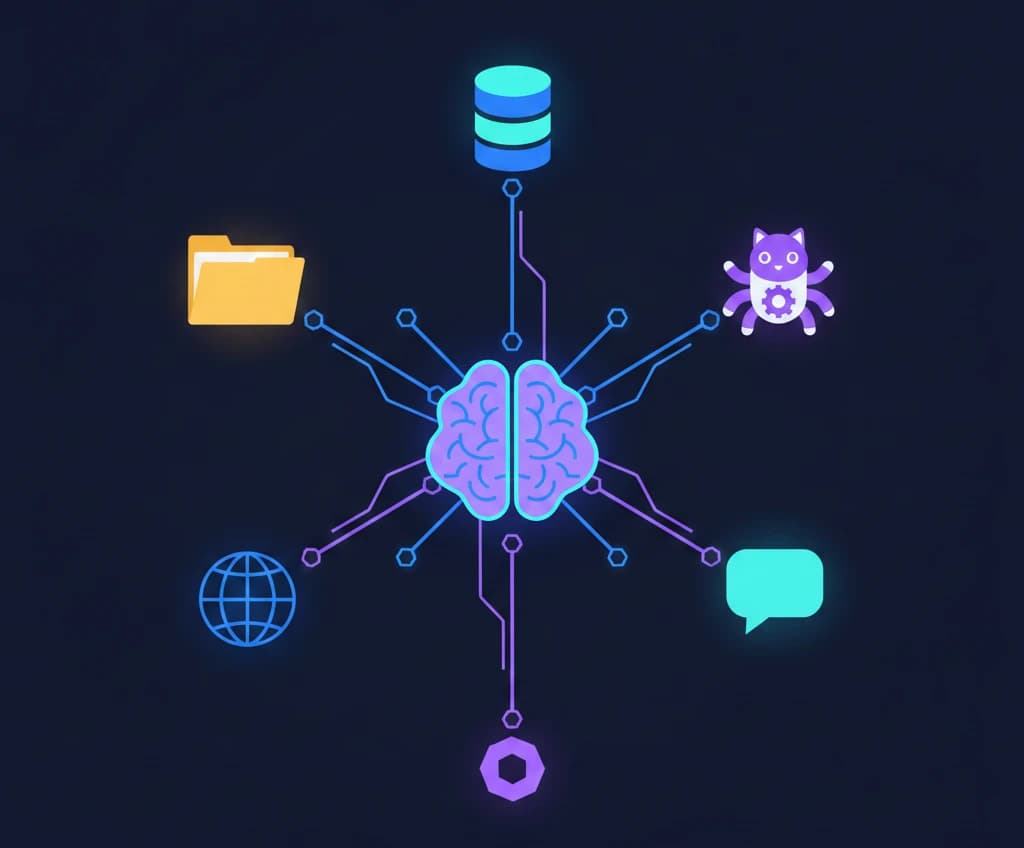
Large language models are powerful, but they have a fundamental limitation: they're isolated from the outside world. An AI model can generate brilliant text, but it can't check your calendar, query your database, or read files on your computer — unless you build a custom integration for each one.
That's exactly the problem MCP (Model Context Protocol) solves. Introduced by Anthropic as an open standard, MCP provides a universal way to connect AI models to external tools, data sources, and services. Think of it as a USB-C port for AI — one standard interface that works with everything.
In this guide, we'll break down what MCP is, how it works, and why it's becoming a foundational piece of the AI ecosystem.
The Problem: AI Models Are Isolated
Today's AI models are trained on vast datasets, but once deployed, they operate in a bubble. When you ask an AI assistant a question, it can only work with:
- The knowledge baked into its training data
- Whatever text you paste into the conversation
This means every time you want an AI to interact with an external system — a database, a file system, an API, a browser — someone has to write custom code to make that connection work. For every AI application and every external tool, that's a separate integration.
The result? An N-times-M integration problem. If you have 10 AI applications and 20 tools, you'd need up to 200 custom integrations. Each one is fragile, hard to maintain, and incompatible with every other.
MCP eliminates this problem by providing a single, standardized protocol that any AI application can use to connect to any tool.
What is MCP (Model Context Protocol)?
MCP (Model Context Protocol) is an open protocol that standardizes how AI applications communicate with external data sources and tools. Released by Anthropic as an open-source specification, MCP defines a common language for:
- Connecting AI models to tools and data
- Exposing capabilities like file access, database queries, and API calls
- Securing those connections with proper access controls
Instead of building bespoke integrations for every AI-tool combination, developers can build to the MCP standard once and have it work across any MCP-compatible application.
MCP in Simple Terms
Imagine you have a smart assistant at your desk. Without MCP, this assistant can only read documents you physically hand it. It can't open your filing cabinet, check your email, or look up records in your database — even though all of those are right next to it.
With MCP, your assistant gets a universal adapter that lets it reach into any of those systems when you ask it to. You stay in control of what it can access, and the assistant uses a standardized method to request and receive information.
How MCP Works: The Architecture
MCP follows a client-server architecture with three core roles:
MCP Hosts
The host is the AI application that the user interacts with — for example, a chat interface, an IDE with AI features, or an AI-powered workflow tool. The host is responsible for:
- Managing connections to MCP servers
- Handling user authorization and consent
- Enforcing security policies
Examples of MCP hosts include Claude Desktop, AI-enabled code editors, and custom AI applications.
MCP Clients
Each host contains one or more MCP clients. A client maintains a one-to-one connection with a single MCP server. The client handles the protocol-level communication: sending requests, receiving responses, and managing the connection lifecycle.
MCP Servers
An MCP server is a lightweight program that exposes specific capabilities through the protocol. Each server typically focuses on one integration — for example, a file system server, a database server, or a GitHub server.
Servers expose three main types of capabilities:
| Capability | Description | Example |
|---|---|---|
| Tools | Actions the AI can perform | Create a file, run a query, send a message |
| Resources | Data the AI can read | File contents, database records, API responses |
| Prompts | Reusable prompt templates | Code review checklist, analysis framework |
The Communication Flow
Here's how a typical MCP interaction works:
- User sends a message to the AI host (e.g., "What are the sales figures for Q4?")
- The host's AI model determines it needs external data and identifies the right tool
- The MCP client sends a structured request to the appropriate MCP server
- The MCP server executes the action (e.g., queries the sales database)
- The server returns results to the client in a standardized format
- The AI model incorporates the data into its response
- The user sees the answer with real data: "Q4 sales totaled $2.4M, up 15% from Q3"
All of this happens through a standardized JSON-RPC 2.0 protocol over secure transport layers, so every MCP server speaks the same language regardless of what it connects to.
Real-World MCP Examples
MCP becomes concrete when you see what it enables. Here are practical examples of MCP servers and what they do:
File System Access
An MCP file system server lets AI read, search, and write files on your local machine or a remote server. Instead of copying and pasting file contents into a chat window, the AI can directly access what it needs.
Use case: Ask your AI assistant to "review the code in my project's src directory" — and it actually reads the files, rather than asking you to paste them.
Database Queries
An MCP database server connects AI models to databases like PostgreSQL, MySQL, or SQLite. The AI can run read-only queries (or write queries with proper permissions) and work with real data.
Use case: Ask "show me all customers who signed up last month but haven't made a purchase" and get results pulled directly from your database.
GitHub Integration
An MCP GitHub server provides access to repositories, issues, pull requests, and code. The AI can read code, create issues, review PRs, and manage repositories.
Use case: Tell your AI assistant to "create an issue for the bug we just discussed and assign it to the backend team."
Web Browsing and Search
MCP servers can provide web access, letting AI models fetch current information from the internet, search for documentation, or retrieve content from specific URLs.
Use case: Ask "what's the current status of the MCP specification?" and the AI fetches the latest information rather than relying on training data.
Slack, Email, and Communication Tools
MCP servers can integrate with communication platforms, allowing AI to read messages, send notifications, or summarize conversation threads.
Use case: "Summarize the key decisions from this week's #engineering Slack channel" — and the AI reads the actual messages.
Custom Business Tools
Because MCP is an open standard, any organization can build MCP servers for their internal tools. CRM systems, project management platforms, monitoring dashboards — anything with an API can be wrapped in an MCP server.
Use case: A company builds an MCP server for their internal analytics platform, letting every AI tool in the organization access business metrics through a single integration.
Why MCP Matters for the AI Ecosystem
MCP is more than a convenience — it represents a fundamental shift in how AI applications are built and connected. Here's why it matters:
1. It Solves the Integration Problem
Before MCP, every AI-tool combination required custom integration code. MCP replaces this with a standard interface. Build an MCP server once for your tool, and every MCP-compatible AI application can use it. Build an MCP client once in your AI app, and it can connect to every MCP server.
This is the same pattern that made USB, HTTP, and SQL transformative. Standards create ecosystems.
2. It Keeps AI Grounded in Real Data
One of the biggest challenges with AI is hallucination — generating plausible but incorrect information. When AI models can access real data through MCP, they produce more accurate and verifiable responses. Instead of guessing, the AI can look up the answer.
3. It Puts Users in Control
MCP includes built-in security and authorization. Users and organizations decide which servers to connect, what permissions to grant, and what data the AI can access. The protocol enforces consent at every step — the AI can't access a tool unless the user explicitly allows it.
4. It Enables an Open Ecosystem
MCP is an open standard, not a proprietary API. This means:
- Any AI provider can build MCP support into their models and applications
- Any developer can create MCP servers for their tools
- Any organization can adopt MCP without vendor lock-in
The result is a growing ecosystem of interoperable AI tools and integrations, rather than walled gardens controlled by individual companies.
5. It Makes AI More Useful in Practice
An AI that can only respond based on its training data is limited. An AI that can check live data, run calculations, execute code, manage files, and interact with services is genuinely useful for real work. MCP is the bridge between "impressive demo" and "daily productivity tool."
MCP vs. Traditional API Integrations
You might be wondering: how is MCP different from just using REST APIs or function calling?
| Feature | Traditional APIs | MCP |
|---|---|---|
| Standardization | Every API is different | One protocol for all integrations |
| Discovery | Must know the API exists | Servers advertise their capabilities |
| Security model | Per-API authentication | Unified consent and authorization |
| AI-native | Built for apps, adapted for AI | Designed specifically for AI-tool interaction |
| Interoperability | N-times-M integrations | Build once, works everywhere |
| Bidirectional | Usually request-response | Supports streaming, notifications, and sampling |
MCP doesn't replace APIs — it builds on top of them. An MCP server for GitHub still uses the GitHub API under the hood. What MCP does is standardize the layer between the AI and the API so that every integration follows the same pattern.
How to Get Started with MCP
If you're a developer interested in MCP, here are practical ways to start:
As an AI User
- Use an MCP-compatible host like Claude Desktop or an AI-enabled code editor
- Install MCP servers for tools you already use (file system, GitHub, databases)
- Configure access permissions to control what the AI can reach
- Experience the difference of AI that can interact with your actual tools and data
As a Developer Building AI Applications
- Add MCP client support to your AI application using the official SDKs (available in TypeScript, Python, and other languages)
- Connect to existing MCP servers to instantly give your app access to dozens of integrations
- Follow the specification at modelcontextprotocol.io for implementation details
As a Tool/Service Provider
- Build an MCP server for your product, making it accessible to every MCP-compatible AI application
- Use the official SDKs to handle protocol details and focus on your tool's unique functionality
- Register your server with the community to increase discoverability
The Future of MCP
MCP is still evolving, but its trajectory is clear. As more AI applications and tool providers adopt the standard, the ecosystem becomes increasingly valuable — a classic network effect.
Key developments to watch:
- Broader adoption across AI providers beyond Anthropic
- Richer server ecosystem with MCP servers for more tools and services
- Enhanced security models including fine-grained permissions and audit logging
- Standardized authentication via OAuth 2.0 and other industry-standard protocols
- Remote MCP servers that run in the cloud rather than locally, enabling easier deployment and management
The pattern is familiar: when the industry agrees on a standard interface, innovation accelerates. HTTP standardized the web. SQL standardized databases. MCP aims to standardize how AI connects to the world around it.
Key Takeaways
- MCP (Model Context Protocol) is an open standard that connects AI models to external tools and data sources through a universal interface
- It follows a client-server architecture where hosts manage connections, clients handle communication, and servers expose tools, resources, and prompts
- MCP solves the integration fragmentation problem — build once, connect everywhere
- It keeps AI grounded in real data, reducing hallucination and increasing usefulness
- The protocol is open source and vendor-neutral, encouraging broad adoption and preventing lock-in
- MCP makes AI practically useful by giving models access to files, databases, APIs, and services in a controlled, secure way
Whether you're building AI applications, creating developer tools, or simply using AI in your daily work, MCP is a protocol worth understanding. It's laying the foundation for a future where AI doesn't just generate text — it gets things done.
Curious about autonomous AI agents? OpenClaw is an open-source agent that connects to your messaging apps and executes multi-step tasks using a skills system — a real-world example of the kind of AI-to-tool integration that MCP enables. Try our free Get Started with OpenClaw micro course to see how it works.
Frequently Asked Questions
What does MCP stand for?
MCP stands for Model Context Protocol. It's an open standard created by Anthropic that defines how AI models communicate with external tools and data sources.
Is MCP only for Anthropic's Claude?
No. While Anthropic created MCP, it's an open protocol that any AI provider can implement. The specification and SDKs are open source, and adoption is growing across the AI industry.
Do I need to be a developer to use MCP?
Not necessarily. If you use an MCP-compatible application like Claude Desktop, you can install and configure MCP servers without writing code. However, building custom MCP servers does require development skills.
Is MCP secure?
MCP is designed with security in mind. The protocol requires explicit user consent before AI can access any tool or data source. Organizations can enforce fine-grained permissions and control which servers are allowed. However, as with any integration, security depends on proper configuration and trusted servers.
How is MCP different from plugins or extensions?
While plugins and extensions are often tied to a specific platform, MCP is a cross-platform standard. An MCP server works with any MCP-compatible host, whereas a ChatGPT plugin only works with ChatGPT. MCP also provides a more structured and secure protocol than most plugin systems.
What programming languages can I use to build MCP servers?
Official SDKs are available for TypeScript and Python, with community SDKs for other languages including Java, Go, Rust, and C#. Since MCP uses JSON-RPC 2.0 over standard transport, you can implement it in virtually any language.
Enjoyed this article?
Join The FreeAcademy Weekly
One practical AI email every Tuesday. New free courses, AI tips, and a short note from the founder.
Free forever. Unsubscribe anytime.
Related articles
How to Build Your First MCP Server: A Step-by-Step Guide
Learn how to build your first MCP server from scratch. This practical guide covers setup, tool creation, and connecting your server to AI assistants.

How Claude's Watermarks Work: Technical Deep Dive, EU AI Act, and What It Means (2026)
Anthropic now watermarks text and files generated by Claude. Learn how SynthID-Text and C2PA provenance work, accuracy, privacy implications, and Community reactions.
Claude Free vs Pro vs Max (2026): Usage Limits, Prices, and Which Plan Is Worth It
Claude Free vs Pro vs Max usage limits explained for September 2026: how the 5-hour and weekly limits work, how much more usage Pro and Max give, which models each plan includes (Opus 5.5, Fable 5.1), and which plan is worth it.