How to Fix Slow XML Parsing in React Native (Updated for 2026)

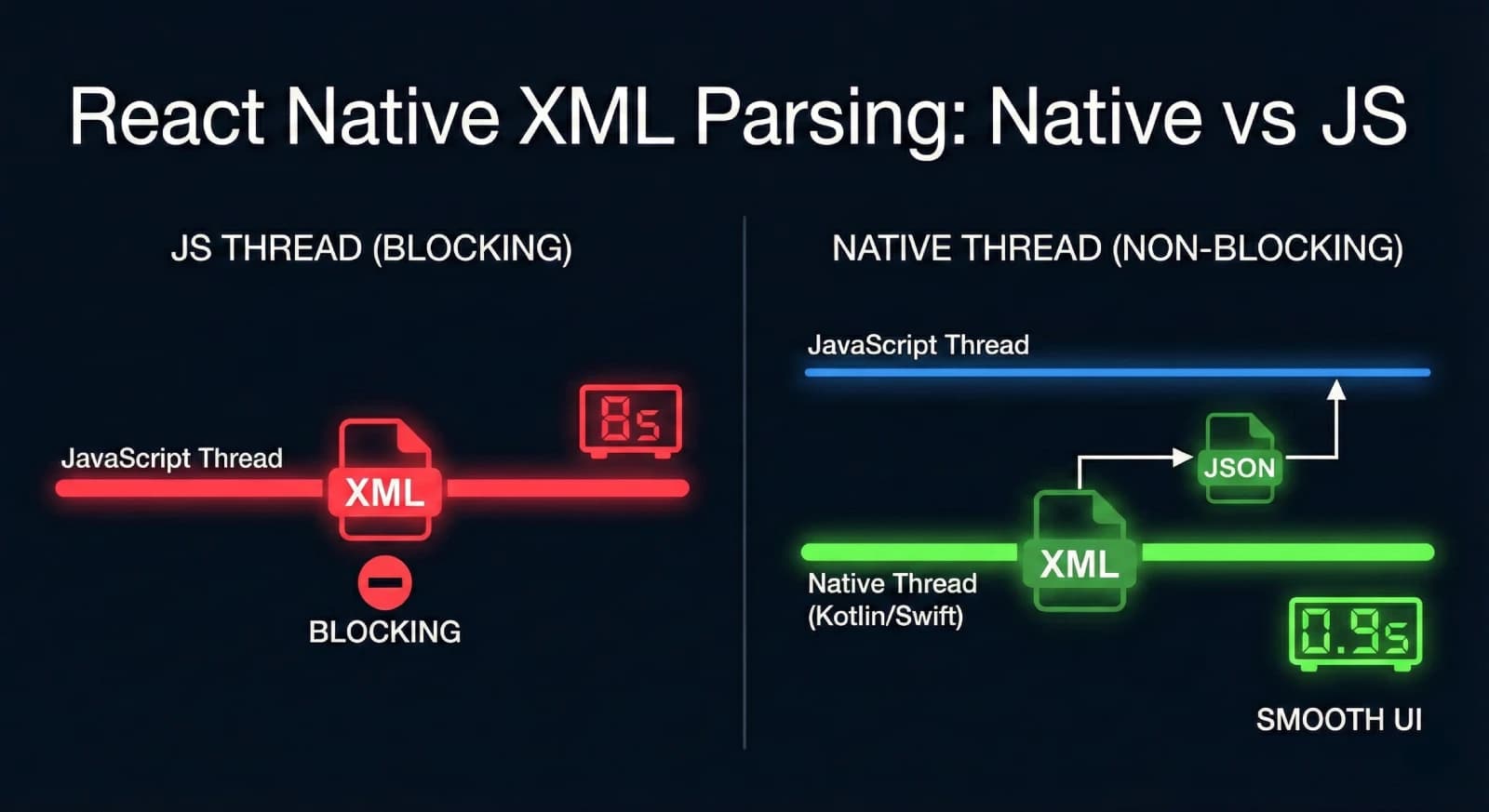
If you've ever parsed XML in a React Native app, you've probably noticed the pain: your UI freezes, animations stutter, and users wait. The culprit? JavaScript XML parsers run on the JS thread, blocking everything else.
I hit this problem on a project where XML parsing took over 8 seconds on low-end Android devices. After moving to a native solution, it dropped to under 2 seconds. You can read the full case study here. Here's how to fix it.
Why JavaScript XML Parsing Is Slow
Popular libraries like react-native-xml2js work fine for small files. But they have a fundamental problem: they run on the single JavaScript thread.
While parsing happens, your app can't:
- Respond to touch events
- Update animations
- Render UI changes
On older devices or with large XML files, this means frozen screens and angry users.
The Solution: Native XML Parsing
Native code (Kotlin on Android, Swift on iOS) can parse XML on a background thread. The JS thread stays free, your UI stays responsive.
You have two options:
- Build your own native module
- Use an existing library
Option 1: Use react-native-turboxml
I built react-native-turboxml to solve this exact problem. It's a TurboModule that parses XML natively using Kotlin coroutines on Android.
Installation
npm install react-native-turboxml
# or
yarn add react-native-turboxml
Usage
import { parseXml } from 'react-native-turboxml';

const xmlString = `
  <root>
    <item id="1">First</item>
    <item id="2">Second</item>
  </root>
`;

const result = await parseXml(xmlString);
console.log(result);
That's it. The parsing happens on a background thread, returns a JavaScript object, and your UI never blocks.
Benchmarks
Testing with a 500KB XML file on a budget Android device:
| Library | Time | UI Blocking |
|---|---|---|
| react-native-xml2js | 3.2s | Yes |
| react-native-turboxml | 0.9s | No |
The time improvement is nice, but the real win is zero UI blocking.
Option 2: Build Your Own Native Module
If you need custom parsing logic, here's the approach.
Android (Kotlin)
Create a native module using Kotlin coroutines and Jackson's XmlMapper:
@ReactMethod
fun parseXml(xmlString: String, promise: Promise) {
    CoroutineScope(Dispatchers.IO).launch {
        try {
            val xmlMapper = XmlMapper()
            val result = xmlMapper.readValue<Map<String, Any?>>(xmlString)
            val writableMap = convertToWritableMap(result)
            promise.resolve(writableMap)
        } catch (e: Exception) {
            promise.reject("PARSE_ERROR", e.message)
        }
    }
}
Key points:
Dispatchers.IOruns parsing off the main thread- Jackson handles the XML-to-Map conversion
- Return a
WritableMapto cross the JS bridge
iOS (Swift)
Similar approach using XMLParser on a background queue:
@objc func parseXml(_ xmlString: String, resolver: @escaping RCTPromiseResolveBlock, rejecter: @escaping RCTPromiseRejectBlock) {
    DispatchQueue.global(qos: .userInitiated).async {
        // Parse XML here
        // Convert to dictionary
        DispatchQueue.main.async {
            resolver(resultDictionary)
        }
    }
}
When to Use Native XML Parsing
Not every project needs this. Use native parsing when:
- XML files are larger than 50-100KB
- You're targeting low-end devices
- Parsing happens during user interaction
- You're parsing multiple files
For small config files parsed once at startup, JavaScript parsers are fine.
Other Performance Wins
While you're optimizing XML handling, consider these:
Parallelize with Promise.all
If you're fetching and parsing multiple files:
// Slow - sequential
const data1 = await parseXml(xml1);
const data2 = await parseXml(xml2);
const data3 = await parseXml(xml3);

// Fast - parallel
const [data1, data2, data3] = await Promise.all([
    parseXml(xml1),
    parseXml(xml2),
    parseXml(xml3),
]);
Cache Parsed Results
Don't parse the same XML twice:
const cache = new Map<string, ParsedData>();

async function getParsedXml(key: string, xmlString: string) {
    if (cache.has(key)) {
        return cache.get(key);
    }
    const result = await parseXml(xmlString);
    cache.set(key, result);
    return result;
}
Consider Your Data Format
If you control the data source, JSON is faster than XML in JavaScript. But if you're stuck with XML from an API or legacy system, native parsing is your best option.
Conclusion
JavaScript XML parsers block your thread and hurt performance. Moving parsing to native code with Kotlin coroutines or Swift's GCD keeps your UI responsive.
The easiest fix: install react-native-turboxml and replace your parser calls.
If you're dealing with performance issues beyond XML parsing, check out my other articles on React Native optimization. FreeAcademy's free Interactive JavaScript Practice course is a great way to sharpen the async and performance patterns that underpin React Native development.
Have questions or found this helpful? Find me on GitHub or LinkedIn.
Enjoyed this article?
Join The FreeAcademy Weekly
One practical AI email every Tuesday. New free courses, AI tips, and a short note from the founder.
Free forever. Unsubscribe anytime.
Related articles

Build a REST API with FastAPI in Python: A Beginner Guide
Learn how to build a REST API with FastAPI in Python. This step-by-step tutorial covers routing, validation, CRUD operations, and deployment basics.
Building AI Agents with Node.js and TypeScript: A JavaScript Developer's Guide to the AI Revolution
Discover how JavaScript developers can build production-ready AI agents without learning Python. Learn about autonomous agents, tool calling, RAG, and full-stack AI applications using Node.js, TypeScript, and the Vercel AI SDK.
How to Build a RAG Chatbot with Next.js and Supabase: A Complete Guide
Learn how to build a production-ready RAG (Retrieval-Augmented Generation) chatbot using Next.js, Supabase with pgvector, and AI embeddings. Step-by-step tutorial for JavaScript developers.